A Free AI Social Media Scheduler That Runs on Your Own API Key
Most "AI-powered" social media tools charge you twice. You pay a subscription, and then you pay again for AI credits — credits that are just tokens from OpenAI, Google or Anthropic, resold at a markup and capped so you run out halfway through the month.
If you already pay for an AI model, or you have a free tier sitting unused, there is a simpler deal: plug your own key into the scheduler and pay the provider directly. That is what bring your own key (BYOK) means, and it is how PostClaw keeps AI writing free on every plan.
What "bring your own key" actually means
Every AI feature in a social tool is a call to some model provider. With built-in credits, the tool makes that call on its own account and bills you for it. With BYOK, the tool makes the same call with your key, so:
- the provider bills you at their published price (or nothing, on a free tier);
- there is no credit counter inside the tool to run out of;
- you choose the model — a fast cheap one for captions, a stronger one for long posts.
PostClaw never marks up these calls. The request goes from PostClaw to your provider with your key, and the bill (if any) comes from the provider.
What stays free
On the Free plan:
- AI writing and the chat agent run on your key, with no limit set by us. New accounts also get a one-off trial of 20 AI calls so you can try it before adding a key.
- You can connect 2 social accounts and schedule posts to them.
- Image, video, voice and music generation need a paid plan. On paid plans they also run on your own key, with the same no-markup rule.
So the honest summary is: if you have a key, writing and scheduling with AI costs you nothing on PostClaw. You pay your provider for what you use.
Which keys work
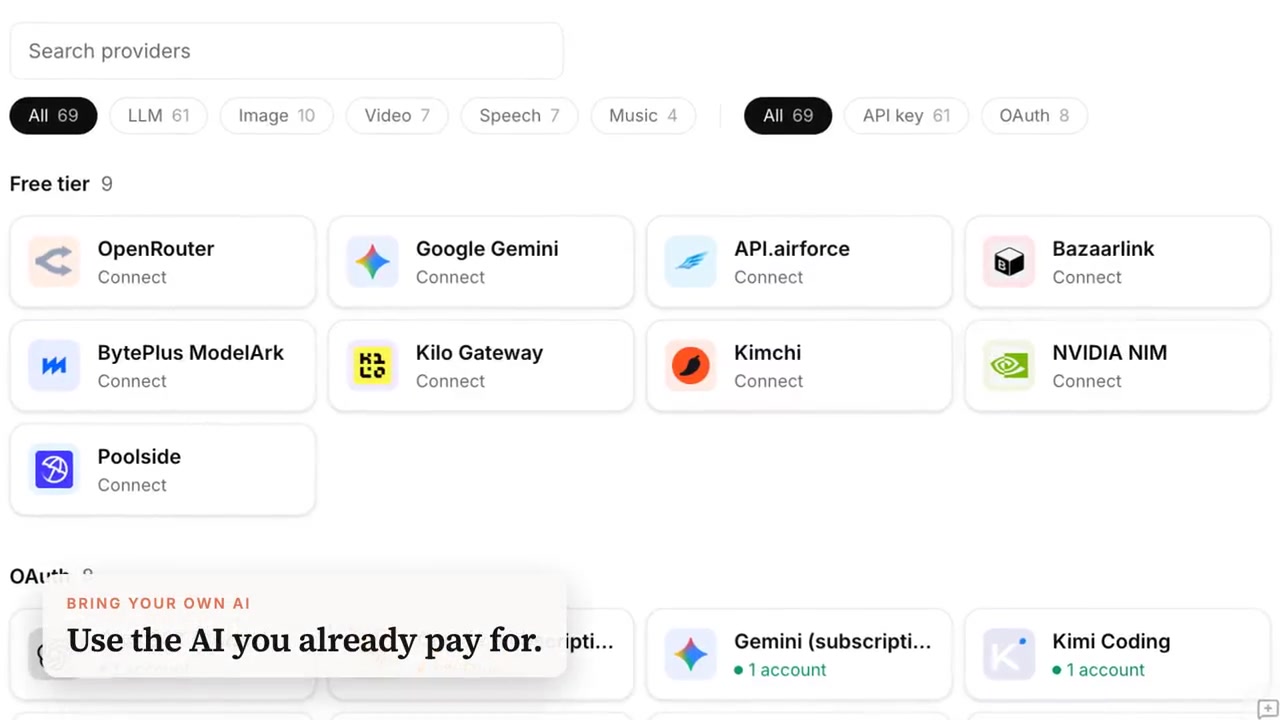
PostClaw connects to 20+ providers. The ones most people start with:
| Provider | How you connect | Good for |
|---|---|---|
| Google Gemini | API key from Google AI Studio (has a free tier) | Everyday captions, fast and cheap |
| OpenAI | API key | Strong general writing |
| Anthropic Claude | API key, or sign in with a Claude subscription | Long-form posts, careful tone |
| ChatGPT | Sign in with your ChatGPT subscription | Writing and images on paid plans |
| OpenRouter | One key for many models | Trying several models |
| Groq, DeepSeek, Mistral and more | API key | Speed or price |
Subscriptions you already pay for (ChatGPT, Claude, Gemini) can be connected by signing in, so you do not need a separate API key at all.
Set it up in two minutes
- Sign in at app.postclaw.fun with Google or GitHub. No credit card.
- Go to Settings → Providers and pick a provider. For Google Gemini, click Add API key, paste the key from Google AI Studio and click Test this key.
- Go to Settings → AI Config and put that connection at the top of AI Agent and Content writing. You can stack several — if the first one fails, the next one takes over.
- Open the Composer, pick your channels and write — or open Chat and ask the agent for posts.
Why this matters more than a feature list
Credit-based tools have a quiet incentive problem: the more you use the AI, the more it costs them, so limits get tighter and the useful model gets reserved for the expensive tier. With BYOK the incentive disappears. You can generate ten variants of a hook, rewrite a thread three times, or run a daily workflow, and the only meter is your provider's.
It also keeps you portable. Your key, your provider account, your usage history — none of it is locked inside the scheduler.
FAQ
Is my key safe? Keys are stored encrypted and are only used for calls you trigger (or workflows you schedule). You can delete a connection at any time from Settings → Providers.
Do I need a paid plan for BYOK? No. BYOK for writing and chat works on Free. Media generation (images, video, voice) needs a paid plan, and then also runs on your key.
What if my free tier runs out? Add a second connection under the first in AI Config. PostClaw falls back to it automatically.
Try it: start free at postclaw.fun — sign in with one click, add your key, and schedule your first post across your channels.